Automating invoice verification means having software handle the formal, factual and arithmetic checks of incoming invoices, instead of keying and matching every invoice by hand. Modern systems use artificial intelligence: an AI reads every invoice, checks it against mandatory fields, tax logic and the purchase order, and approves unambiguous cases fully automatically. This cuts processing time from minutes to seconds, reduces errors and protects against duplicate payments and fraud.
This guide shows how AI-based automation works technically, what the process looks like, which use cases pay off, what to look for when choosing software, and why template-free AI is the decisive difference. For what invoice verification covers in general, see our foundational invoice verification guide.
Key takeaways
• Automated invoice verification handles capture, extraction, validation and approval in software.
• AI instead of classic OCR: the AI understands every layout, even unknown ones, and needs no template per supplier.
• Up to 80 % touchless processing: unambiguous invoices run through without human intervention.
• Integrated with SAP, DATEV and other ERP systems via connector or API.
• Stays compliant with VAT law, GoBD and GDPR, with a complete audit trail.
In practice this is handled by our AI invoice verification software, which checks every invoice without a template.
Why manual invoice verification no longer scales
Manually checking every incoming invoice is slow, expensive and error-prone. Staff key in amounts, match them against purchase orders and chase approvals, often across many hands and email loops. The result: long processing times, missed early-payment discounts, overlooked duplicate payments and high headcount spent on pure routine.
With the B2B e-invoicing mandate (receiving obligation since January 2025 in Germany), the pressure grows. One important nuance: a PDF is not an e-invoice. Only a structured data set such as ZUGFeRD or XRechnung is a true e-invoice, and exactly this structured data is especially well suited to automated verification.
What is automated invoice verification with AI?
Automated invoice verification with AI is a process in which artificial intelligence independently reads, validates and prepares the incoming invoice for decision. Unlike rule-based automation with rigid templates, the AI understands the invoice in substance instead of merely matching a predefined pattern.
The system recognizes supplier, line items, amounts, tax and IBAN on every invoice, checks the mandatory fields, recalculates the totals and matches against purchase order and goods receipt. Unambiguous cases are approved, unclear ones escalated.
How much time would automation save you?
Drag the slider to your invoice volume and see the time potential in 30 seconds.
Calculate your potential →
How the AI automation works
A modern AI automates all three verification dimensions in a single pass:
- AI extraction: the AI reads every invoice, regardless of format and layout. PDF, scan, email attachment, ZUGFeRD and XRechnung are handled equally, without a template.
- Formal check: mandatory fields, tax statement and invoice number are checked automatically.
- Arithmetic check: line items, totals and tax amounts are recalculated.
- Factual check (3-way match): quantities, prices and terms are matched against purchase order and goods receipt.
- Decision: unambiguous invoices are processed touchless (up to 80 %), deviations are flagged and escalated, including the four-eyes principle.
- Learning: every correction flows back into the model. Accuracy improves with each invoice.
OCR vs. AI: why templates fail
Classic OCR needs a template for every supplier. A new supplier or a changed layout means project effort, and a shifted field breaks recognition. A template-free AI understands the layout itself, even for an invoice it sees for the first time. That is the difference between "digitized" and "truly automated".
Better to see once than read twice:
Watch automation in the video →
The automated invoice verification process
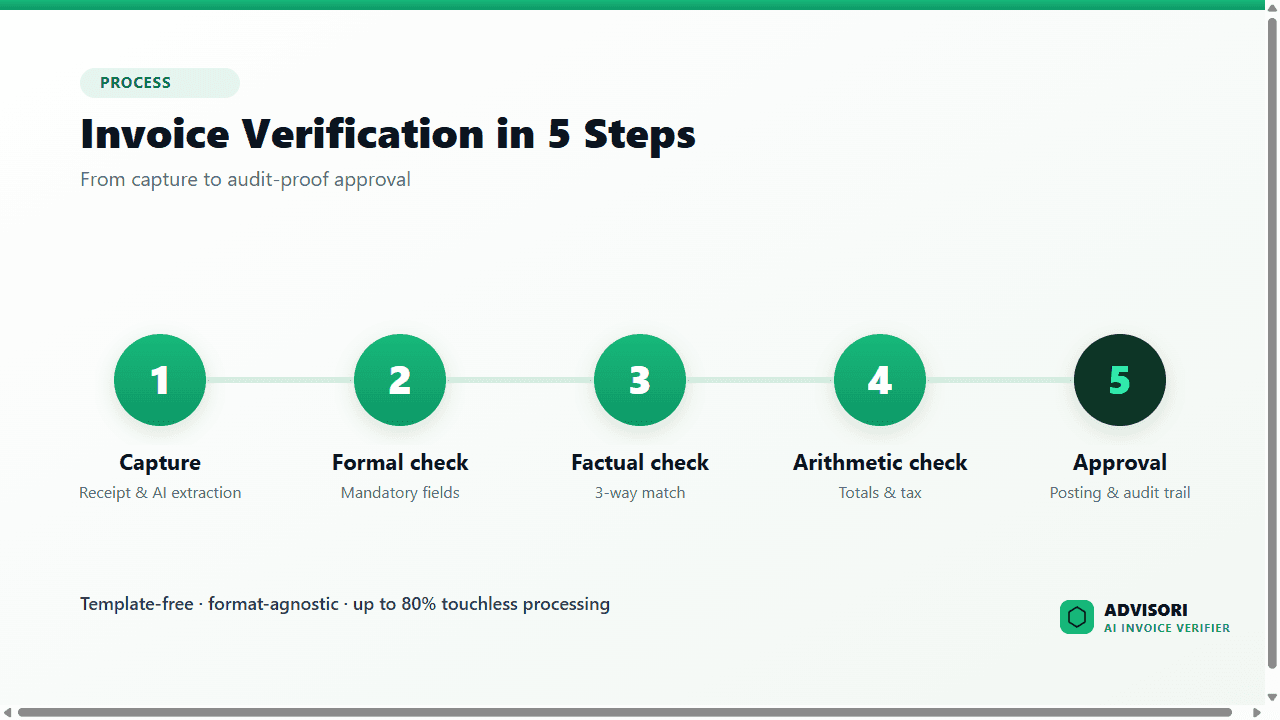
- Receipt & AI extraction: the invoice arrives by email, API or upload and is read automatically.
- Formal check: mandatory fields are verified.
- Factual check: 3-way match against purchase order and goods receipt.
- Arithmetic check: totals and tax amounts are recalculated.
- Approval & posting: unambiguous cases are processed touchless and handed to the ERP in an audit-proof way.
Use cases from practice
- High document volume: companies with tens of thousands of invoices per year cut manual effort drastically.
- Many different suppliers: where every supplier invoices differently, template-free AI shows its biggest advantage.
- Decentralized approvals: invoice workflows route approvals by role across sites and departments.
- Fraud prevention: duplicates, changed IBANs and unusual patterns are caught before payment.
Integration with SAP, DATEV & more
Automated invoice verification is only as good as its integration. Approved documents must flow into the accounting system without a media break. Good solutions match invoices against purchase order and goods receipt and hand them over via connector or API to SAP, DATEV, Microsoft Dynamics and other ERP and DMS systems, turning verification into an end-to-end purchase-to-pay process.
THE DIFFERENCE: The only solution that automates every invoice without a template
The ADVISORI AI invoice verifier is format-agnostic, industry-independent and continuously learning. New invoice types are set up in minutes, not projects. Compliant with VAT law, GoBD and GDPR, operated in Germany.
• Up to 80 % touchless processing, with no human intervention
• PDF, scan, ZUGFeRD and XRechnung handled equally
• Connected to SAP, DATEV and more via connector or API
Explore the solution →
What to look for when choosing software
Not every "automated" solution delivers what it promises. These criteria separate real AI from dressed-up OCR:
- Template freedom: Does it understand new layouts without training, or does every supplier need a template?
- Format coverage: PDF, scan, ZUGFeRD and XRechnung equally?
- Verification depth: Mandatory fields, tax logic, arithmetic totals and 3-way match, not just text recognition?
- Learning ability: Does the system improve with every correction?
- Integration: Clean connection to SAP, DATEV and your DMS?
- Compliance: Audit-proof trail, GDPR, EU AI Act, operated in a trusted region?
- Fraud protection: Duplicate and IBAN checks built in?
Compliance and governance when rolling out
Automation does not remove responsibility. Invoices are tax-relevant documents, so verification must be logged in an audit-proof and compliant way. A clear governance model helps: unambiguous cases fully automatic, critical or deviating cases into the four-eyes principle. Control is retained while the routine is automated. A solution aligned with the EU AI Act and ISO/IEC 42001 adds extra assurance.
The benefits at a glance
- Faster: processing time per invoice from minutes to seconds.
- Cheaper: up to 80 % touchless processing relieves the team.
- Safer: duplicates, fraud and formal errors are reliably caught.
- Compliant: a complete, audit-proof trail.
- Scalable: more volume without more headcount.
Automate invoice verification on your own invoices.
In a 30-minute live demo, we verify your real invoice formats automatically and calculate your business case concretely. No obligation, with your real invoices.
Book a live demo →
Further reading: For checking electronic invoices specifically, see the in-depth guide How to Validate an E-Invoice. To automate the approval of verified invoices, see Automate Invoice Approval with AI. Why template-based OCR fails on changing invoice layouts is explained in OCR vs. AI Extraction: Why Templates Fail.
Which software types exist is shown in the invoice verification software comparison.
For ERP integration, see invoice verification with SAP & DATEV.
Frequently asked questions (FAQ)
What is automated accounts payable invoice processing?
It is the software-based control of incoming invoices. Capture, extraction, formal and arithmetic checks and matching against the purchase order run without manual keying, and unambiguous cases are approved automatically.
How can I verify invoices digitally and automatically?
With an AI-based solution: the invoice is read in by email, API or upload, extracted by the AI, checked against mandatory fields, tax logic and the purchase order, and approved automatically when unambiguous. Deviations are escalated.
What is the difference between OCR and AI invoice verification?
Classic OCR needs a template per supplier and breaks on layout changes. An AI understands the layout itself, even for unknown invoices, and keeps learning.
Can automated invoice verification integrate with SAP?
Yes. Good solutions hand approved documents to SAP, DATEV and other ERP systems via connector or API, after matching against purchase order and goods receipt.
Does automated verification stay compliant?
Yes. Every verification is logged in an audit-proof way. A compliant solution produces a complete audit trail across every rule decision and approval.
About ADVISORI FTC GmbH: ADVISORI builds AI-based, compliant solutions for automated invoice verification, operated in Germany. Certified to ISO 27001, ISO/IEC 42001 and SOC 2 Type II.

AI Invoice Verification · ADVISORI
Every invoice. Every format. Every industry.
ADVISORI's AI invoice verifier is format- and industry-agnostic — universal, set up in minutes and ready to go. See it for yourself in the video — and test it live with your own invoices.
- Format-agnostic: XRechnung, ZUGFeRD, PDF — universal
- Industry-agnostic: works in any sector
- Ready in minutes · transparent checking logic, no black box