Validating an e-invoice means checking it on two levels: format conformity (does the structured data set match the European standard EN 16931, i.e. ZUGFeRD or XRechnung?) and content accuracy (are all mandatory fields present, are tax and totals correct?).
Only when both levels pass is the e-invoice valid, postable and eligible for input-tax (VAT) deduction.
This guide shows step by step how to validate an e-invoice, which free validators exist, which error messages are typical, and how companies check hundreds or thousands of e-invoices automatically with AI. For what invoice verification covers in general, see our foundational invoice verification guide.
Key takeaways
• An e-invoice is a structured data set (XML), not a PDF. The common formats are ZUGFeRD and XRechnung.
• Checking happens on two levels: technical format conformity (EN 16931) and content (mandatory fields, tax, totals).
• For the technical check there are free validators (KoSIT, ELSTER e-invoice viewer, regional validators).
• A passed format check does not mean the invoice is factually correct. Both levels are required.
• At high volume, automated, AI-based checking beats manual one-by-one validation.
At scale, you can validate XRechnung and ZUGFeRD automatically, including mandatory-field checks and purchase-order matching.
What is an e-invoice, and what must be checked?
Since 1 January 2025, companies in Germany must be able to receive and process e-invoices in B2B. Important: a PDF is not an e-invoice. A true e-invoice is a structured, machine-readable data set based on the European standard EN 16931. Two formats are common:
- XRechnung: a pure XML format, used mainly in public procurement.
- ZUGFeRD: a hybrid format, a PDF with embedded XML. Humans see the PDF, software reads the XML.
So two things must be checked: whether the data set is technically standard-conformant, and whether the mandatory content is correct.
Why validating e-invoices matters
- VAT deduction: only a formally correct invoice entitles you to deduct input tax. A missing mandatory field can void it.
- Postability: a non-conformant data set can be rejected by ERP and accounting systems.
- Fraud and error protection: wrong amounts, duplicates or changed bank details must surface before payment.
- Compliance: the check must be documented in an audit-proof way.
FREE TOOL: Validate your e-invoice in 30 seconds
Upload a ZUGFeRD or XRechnung file and instantly see whether the format (EN 16931) and mandatory fields are conformant. No sign-up.
Validate an e-invoice now →
The two levels of e-invoice validation
1. Format conformity (technical validation)
This checks whether the XML data set matches the standard EN 16931 and the national rules (for XRechnung, the KoSIT specifications). Validators check the data set against stored business rules (the BR rules) and report every deviation. This check is purely technical: it tells you whether the file is correctly built, not whether the invoice content is factually right.
2. Content check (mandatory fields and factual accuracy)
At this level you check whether the mandatory fields are complete, the tax logic is correct, the totals add up and the invoice is factually justified (was the service delivered as stated, does it match the purchase order?). A format validator does not do this.
Rule of thumb: a green-validated e-invoice is technically correct, but not necessarily factually right. The two levels belong together.
ZUGFeRD vs. XRechnung: what you need to know
- Structure: pure XML; PDF with embedded XML (hybrid)
- Human-readable: only with a viewer; yes, as a PDF
- Typical use: public-sector buyers; B2B in general
- Standard basis: EN 16931; EN 16931
- Validation: validate the XML; validate the XML inside the PDF
Step by step: how to validate an e-invoice
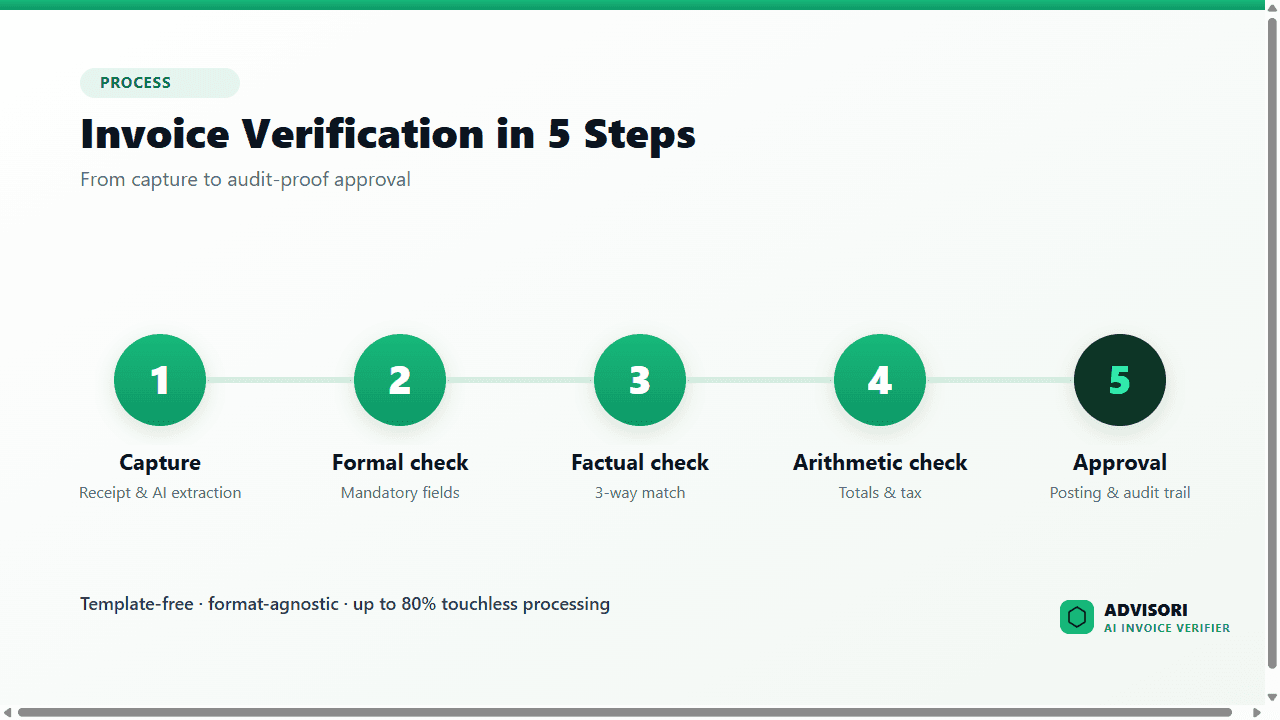
- Open the data set: for ZUGFeRD, extract the embedded XML; for XRechnung, use the XML file directly.
- Validate the format: run the data set through a validator (EN 16931 plus national rules). Errors appear as BR messages.
- Check mandatory fields: verify supplier, customer, tax number/VAT ID, invoice number, description, tax rate and amounts.
- Check arithmetic: recalculate line items and net, tax and gross totals.
- Check factually: match against purchase order and goods receipt (3-way match), check duplicates and IBAN.
- Document: record the result in an audit-proof way.
Free tools to validate e-invoices
For the technical format check there are free, partly official validators:
- KoSIT validator: the open-source reference validator for XRechnung, which many other tools validate against.
- ELSTER e-invoice viewer: a free offering from the German tax administration to display and basically check e-invoices.
- Federal and regional validators: for example the check tools of the public invoice-receipt platforms, and validators of individual German states.
- Peppol validators: for invoices sent over the Peppol network.
These tools tell you whether the format is correct. They do not perform the content and factual check (mandatory fields, tax, matching against the purchase order). That is exactly where a complete solution comes in.
Format and content in one step:
Watch the check in the video →
Typical error messages and how to handle them
Validators report errors as rule violations. The most common cases:
- Missing buyer reference (routing ID): A mandatory field for public-sector buyers is missing; Request the routing ID from the buyer and add it
- Invalid or missing tax rate / tax category: Tax details incomplete or contradictory; Request a corrected invoice from the supplier
- Arithmetic mismatch: Line-item sum does not match the total; Ask the supplier to correct it
- Invalid VAT ID or missing mandatory field: A mandatory field is missing or wrong; Request a corrected invoice
- File does not match the schema: The data set is not valid EN 16931 XML; Request the correct format from the sender
Important: a faulty e-invoice should go back to the sender for correction. Only the corrected invoice is valid.
Why you should not blindly trust the software
A passed format check does not mean the invoice may be paid. The data set can be technically perfect and still factually wrong: inflated quantities, a duplicate submission, a changed IBAN. That is why every serious check includes a content and factual review plus clear escalation paths for doubtful cases. Automation does not replace control; it makes it faster and complete.
Validating e-invoices automatically and at scale
For a few invoices, a manual validator is enough. At hundreds or thousands of incoming invoices per month, one-by-one checking becomes a bottleneck. Here an AI-based solution checks both levels automatically: it validates the format, checks the mandatory fields, recalculates totals, matches against purchase order and goods receipt, and approves unambiguous cases fully automatically. How that works is covered in automate invoice verification with AI.
FOR COMPANIES: Every e-invoice checked automatically, format and content
The ADVISORI AI invoice verifier processes ZUGFeRD and XRechnung natively, validates against EN 16931 and mandatory fields, matches against the purchase order and detects duplicates and fraud. Format-agnostic, without templates, compliant and operated in Germany.
• Format validation and content check in a single pass
• Up to 80 % touchless processing, only exceptions to the team
• Connected to SAP, DATEV and more via connector or API
Explore the solution →
E-invoicing mandate: the key dates
- Since 1 January 2025: all companies must be able to receive e-invoices in B2B.
- From 2027: obligation to issue for companies above a certain prior-year revenue.
- From 2028: issuing obligation for all remaining B2B companies.
Whoever sets up checking now is ready for every stage, and aligned with the EU's ViDA direction.
Benefits of end-to-end e-invoice validation
- Legally safe: VAT deduction and postability are secured.
- Fast: format and content are checked in seconds.
- Complete: every check is documented in an audit-proof way.
- Safe: duplicates and fraud are caught before payment.
- Scalable: even thousands of e-invoices per month without extra effort.
Validate your e-invoices on your own documents.
In a 30-minute live demo, we check your real ZUGFeRD and XRechnung formats and calculate your business case concretely. No obligation, with your real invoices.
Book a live demo →
Further reading: Which deadlines apply and who is affected from when, see Germany’s E-Invoicing Mandate 2025–2028.
Frequently asked questions (FAQ)
How do you validate an e-invoice?
On two levels: format conformity against EN 16931 with a validator, and a content check of the mandatory fields, tax logic and totals. Both are needed before the invoice is approved.
How do I validate an XRechnung or ZUGFeRD for free?
With a free validator such as the KoSIT validator, the ELSTER e-invoice viewer or regional validators. They check the format; the content check must be done in addition.
What does it mean to check an e-invoice for conformity?
Conformity means the structured data set matches the European standard EN 16931 and the national rules (for XRechnung, the KoSIT specifications). A validator checks this against stored business rules.
Is a PDF an e-invoice?
No. A plain PDF is not an e-invoice. Only a structured data set such as XRechnung (XML) or ZUGFeRD (PDF with embedded XML) qualifies as an e-invoice under the mandate.
How do I validate many e-invoices at once?
With an automated, AI-based solution that validates format and content, matches against the purchase order and approves unambiguous cases automatically while escalating exceptions.
About ADVISORI FTC GmbH: ADVISORI builds AI-based, compliant solutions for the automated verification of incoming and electronic invoices, operated in Germany. Certified to ISO 27001, ISO/IEC 42001 and SOC 2 Type II.

AI Invoice Verification · ADVISORI
Every invoice. Every format. Every industry.
ADVISORI's AI invoice verifier is format- and industry-agnostic — universal, set up in minutes and ready to go. See it for yourself in the video — and test it live with your own invoices.
- Format-agnostic: XRechnung, ZUGFeRD, PDF — universal
- Industry-agnostic: works in any sector
- Ready in minutes · transparent checking logic, no black box